
The My Account section is home to your account information and preference settings.
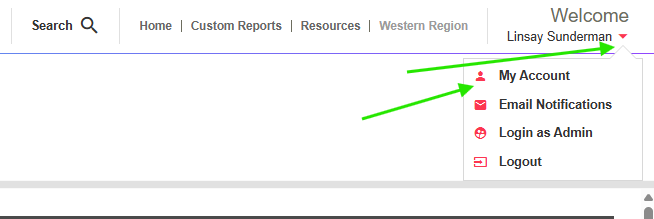
On the upper right hand side of the Customer Portal, click the red drop down arrow and then select “My Account”.
In the My Account section you can:
- Change your Password - you can change your current password here. If your password has expired, please request a new one from either your company Administrator or your BV representative.
- Change your Preferred Date and Time Formats - You can change the date format to display the order of which the day, month and year appears. You can also change the time to either be displayed as a 12 hour clock or a 24 hour clock.
- Choose to Display Non Analytical Jobs - you will be able to see all jobs in our system, including those associated with supply orders or other items that may be invoiced.
- Choose to Suppress Duplicates - lab duplicates will not be visible on the Customer Portal. If you would like the lab duplicates removed from your reports, please contact your BV representative.
- Change your Preferred Language - choose between English or Freh here.
- Update your Phone Numbers - you can update your phone or cell phone numbers here.
- View your Systems Administrators (the users that can oversee your access)
- View your Account Contacts by their company name (the BV representatives associated with that company)